Jujutsu in 5 minutes
Jujutsu is a version control system with a simpler model than Git. The model is small enough to fit in five pictures - so this article shows it that way.
JJ runs on your existing local Git repo. Your team still sees plain Git commits and PRs. Nothing migrates. If you tried JJ and don't like it, put your in-progress work on a Git branch, delete .jj folder, and you're back to plain Git.
Five things separate JJ from Git. Here they are.
1. Your changes are a tree.
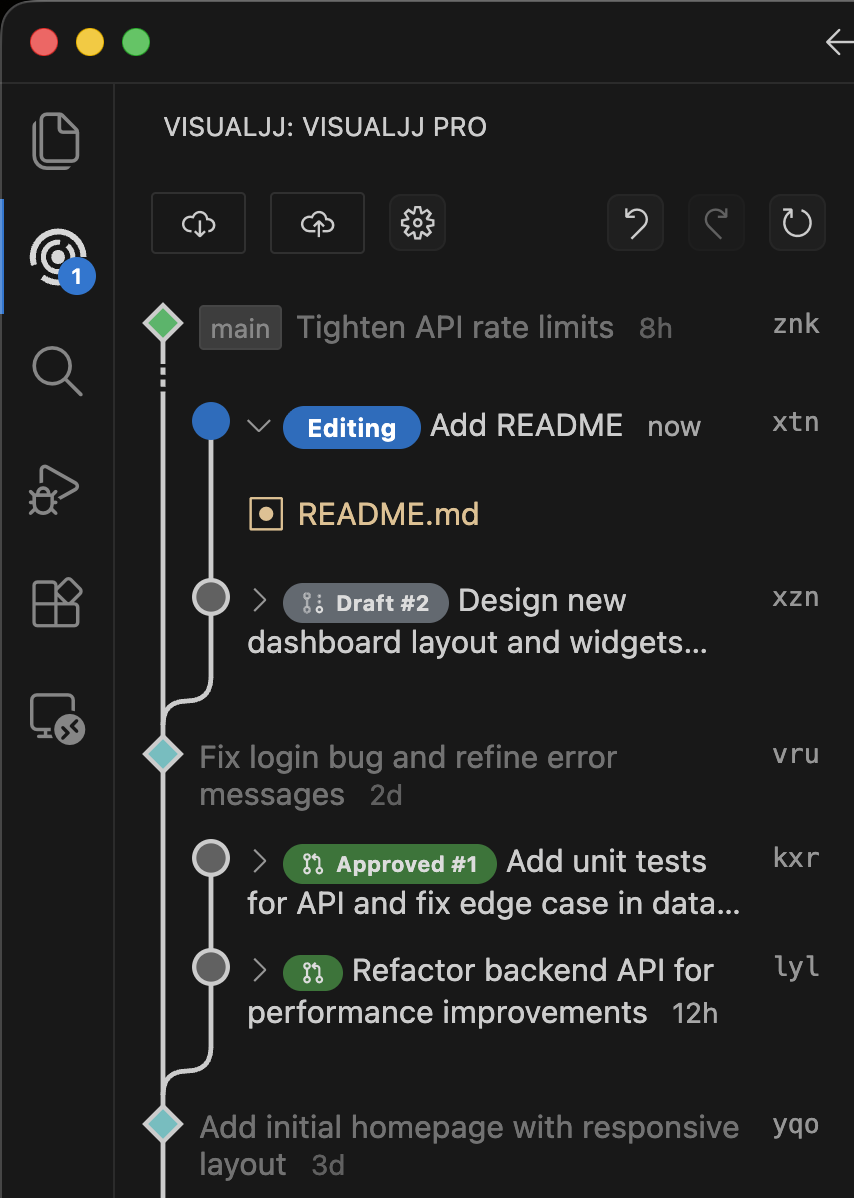
In Git, work is organized in branches - named pointers you create, switch between, and remember to update. JJ skips this.
You make a change, then another, then another - and they form a tree. Any change can have children; any change can be a parent. You see your in-progress work and the trunk in one view, and you move around by clicking, not by switching branches.
2. Your working copy is a commit.
In Git, your work lives in three places: the working copy, the index (staged), and committed history. You git add, then git commit, then maybe git stash when you switch. Three places, three commands, a constant chance of forgetting one.
In JJ, the file system is the current change. Edit a file - the change updates. Switch to another change - the file system updates. There's no staging area, no commit step, no stash. (Files in .gitignore are still ignored - JJ doesn't track what Git wouldn't.)
In practice you stop thinking about whether something is committed. It always is.
3. Changes survive rewrites.
In Git, a commit is identified by its hash. The moment you amend, rebase, or squash, the hash changes - and any branch or PR pointing at the old hash now points somewhere else. This is why force-pushing feels fraught, and why rebasing a PR breaks review threads.
In JJ, every change has a stable ID that survives rewrites. Amend, rebase, split, reorder - the ID stays the same. Your PR keeps pointing to the same change, even after you've reshaped it. Your reviewer sees the same PR updated, not a fresh diff with no history.
The drag above moved the change to a new parent. The change's identity moved with it.
A reviewer asks for a fix three commits down. In Git: stash, checkout, rebase -i, edit, force-push, hope. In JJ: click the change, edit, push. Descendants auto-rebase. The PR updates.
4. Conflicts don't stop you.
In Git, a merge or rebase conflict halts everything. You're frozen mid-operation - can't keep editing the next file, can't run tests, can't pivot. Resolve it now, or back out and try later.
In JJ, a conflict is recorded as state in the change. You keep working on other changes. You fix it when you have the context - not when you're trying to do something else.
5. Undo works for everything.
JJ records every operation - commit, rebase, split, squash, describe - in an op log. One shortcut reverses the last one. Mis-typed a rebase? Click "Undo". Squashed the wrong pair? Click "Undo".
Git has the reflog, technically, but few people find it under pressure. In JJ, undo is a button. The result: you stop being cautious. Reshape becomes a reflex.
(Operations that touch the remote - push, fetch - can't always be undone, since they involve state outside your local repo.)
What's the catch?
Two real ones:
- The ecosystem is young. A few Git features - LFS, submodules, pre-commit hooks - have rough edges.
- You'll unlearn some Git habits. No
git addthengit commitceremony, branches optional. The unlearning is small but real, and it takes a few days.
Try it
Install VisualJJ and open any Git repo - you'll see your own in-progress changes the way they appeared above. (Prefer the CLI? Install JJ from here.)